
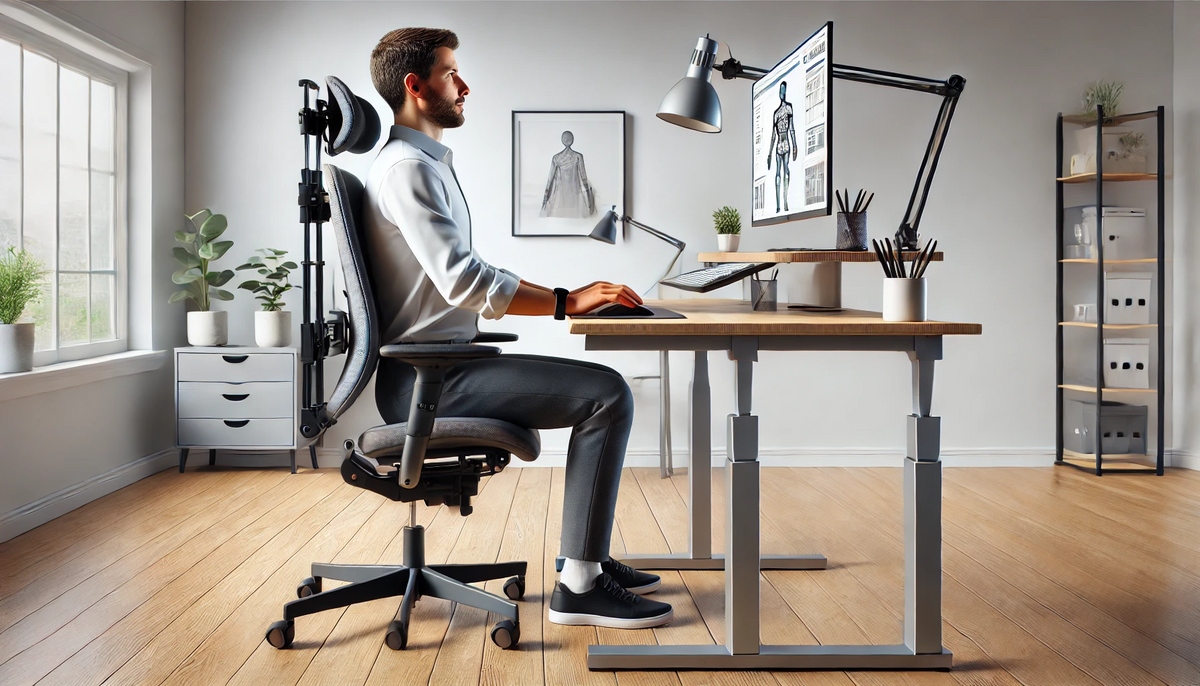
In today's digital age, most of us spend hours in front of our screens, whether for work, leisure, or socializing. While the flexibility of remote and office work has its perks, it also brings certain health challenges, especially concerning posture and neck health. If you've been noticing stiffness, discomfort, or chronic pain in your neck, it might be time to rethink your workstation setup and daily posture habits.
In this article, we’ll explore why an ergonomic workstation is essential, how poor posture affects your neck, and actionable tips to maintain a healthy posture at your desk.
Why Ergonomics Matter for Workstations
Ergonomics refers to the science of designing workspaces that align with human needs and capabilities, minimizing stress on the body. An ergonomic workstation aims to prevent physical strain by adapting the workspace to meet an individual's physical characteristics.
- Prevents Chronic Pain: Ergonomic workstations can significantly reduce the risk of chronic pain, particularly in the neck, shoulders, and lower back.
- Improves Productivity: Comfort leads to better focus. When we’re not distracted by discomfort, we can work longer and more effectively.
- Reduces Risk of Long-term Injury: Poor ergonomics can lead to repetitive strain injuries and other long-term health issues. Correcting workstation setup early on can prevent these problems before they arise.
How Poor Posture Affects the Neck
Your posture plays a significant role in how much stress is placed on your neck muscles and vertebrae. When we slouch or look down at our screens, we put added weight and pressure on our necks. This phenomenon is often referred to as “text neck” or “tech neck.” Here’s how poor posture contributes to neck pain:
- Increases Load on Spine: For every inch your head leans forward, it adds about 10 pounds of additional weight for your neck muscles to hold. Over time, this can lead to muscle fatigue and strain.
- Causes Muscle Imbalances: Prolonged poor posture can cause certain muscles to weaken and others to overcompensate, leading to imbalances that affect the entire spine and upper body.
- Leads to Tension Headaches and Fatigue: Misalignment of the neck can lead to tension headaches, muscle stiffness, and fatigue, which affects both physical and mental performance throughout the day.
Setting Up an Ergonomic Workstation for Neck Health
Creating an ergonomic workstation doesn’t require a complete office remodel. With a few key adjustments, you can set up a workspace that supports your body’s natural posture.
-
Monitor at Eye Level: Position your monitor so the top of the screen is at or slightly below eye level, keeping your head straight and avoiding tilting up or down.
-
Invest in an Adjustable Chair: Choose a chair that provides good lumbar support and can be adjusted for height so that your feet rest flat on the floor.
-
Keyboard and Mouse Placement: Keep your keyboard and mouse close, with your elbows at a 90-degree angle, to prevent strain on the shoulders and neck.
-
Desk Height: Adjust your desk to a height that allows you to keep your shoulders relaxed and your elbows at a comfortable angle. Ideally, your forearms should be parallel to the ground.
-
Consider a Standing Desk Option: Switching between sitting and standing throughout the day can relieve pressure on the spine and promote better posture.
Posture Tips to Support Neck Health
Even with a well-designed ergonomic workspace, maintaining good posture is essential for neck health. Here are some practical tips:
-
Avoid Forward Head Posture: Be mindful of the head's position in relation to the body. Try to keep your ears aligned with your shoulders, and avoid leaning forward.
-
Keep Shoulders Relaxed: Tension in the shoulders can strain the neck. Relax your shoulders down and back to prevent unnecessary tension.
-
Frequent Breaks and Stretches: Every 30 minutes, take a break to stretch your neck, shoulders, and back. Simple exercises like neck rotations and shoulder shrugs can prevent stiffness.
-
Use a Supportive Chair or Back Cushion: Proper lumbar support helps maintain a straight posture, which indirectly supports the neck.
-
Practice “Chin Tucks”: This simple exercise helps strengthen neck muscles and correct forward head posture. Gently tuck your chin back, aligning it with your spine. Hold for a few seconds and release.
Additional Benefits of an Ergonomic Workstation and Good Posture
Beyond neck health, there are many additional benefits of an ergonomic setup and mindful posture:
- Reduced Fatigue: Good posture promotes better circulation, which means more oxygen reaches your muscles, reducing fatigue and helping you stay energized.
- Improved Mental Clarity: Physical discomfort can cloud focus. When you’re comfortable, it’s easier to stay engaged and think clearly.
- Enhanced Longevity of Physical Health: Ergonomics isn’t just a temporary fix; it promotes long-term health by preventing musculoskeletal issues, promoting flexibility, and reducing overall strain.
Closing Thoughts
Investing in an ergonomic workstation and practicing good posture habits isn’t just about avoiding discomfort today. It’s about preventing long-term health issues and promoting a more sustainable, comfortable work routine for years to come. So, whether you’re setting up your home office or revamping your corporate workspace, remember to put your neck health first.
By creating a workspace that supports your body’s natural alignment and adopting positive posture habits, you’re not only ensuring a healthier neck but also laying the foundation for improved productivity, energy, and overall well-being.
Share:
How to Choose a Pillow
The Silent Strain: How Poor Posture and Neck Pain Impact Dentists’ Health and Performance